
Build a "Self-Learning" EL Defect Detection AI on Your Own Computer
Introduction
EL (electroluminescence) is the "X-ray" module factories use most: cracks, broken fingers, black cores and poor solder joints are plain to see in an EL image. But a production line produces thousands of EL images a day, all judged by inspectors staring at screens. They tire after long hours, standards shift when people change, and when veterans leave, their experience leaves too. This article isn't about papers; it does one thing: walk you through building a usable EL detection program on your own computer, and making it more accurate the more it is used. You don't need to know how to code; just follow along.
01The big picture: three parts of the system
When people hear "self-learning AI", many imagine a program figuring things out and improving on its own. In a factory, the reliable approach is the opposite: the machine "looks", people "teach", and a fair "exam" acts as gatekeeper. All three are indispensable.
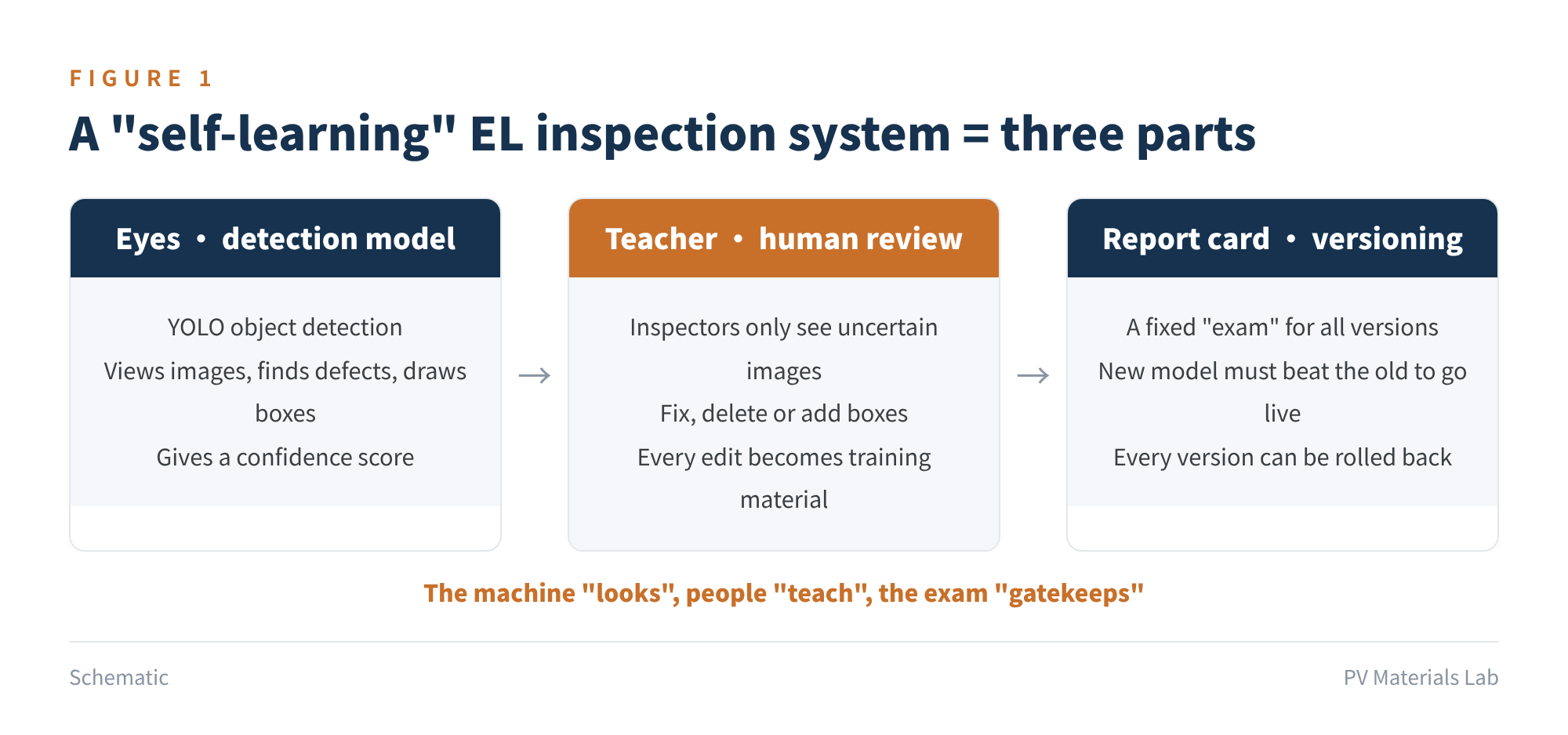
Figure 1 A "self-learning" EL inspection system has three parts
- Eyes: the detection model. We use the open-source YOLO object detection model. Given an EL image, it boxes the defects, says what class each is, and gives a "certainty" (confidence) between 0 and 1.
- Teacher: human review. Images the AI is unsure about go to inspectors. They fix, delete or add boxes in a labelling tool, and every edit becomes new "teaching material".
- Report card: version management. Prepare a fixed "exam". After each round of learning, the new and old models sit the same exam; the new one goes live only if it passes, otherwise the old one stays.
Why YOLO? It is open source, well documented, and a few lines of code can train your own model. Ultralytics released YOLO26 in January 2026, with an NMS-free end-to-end design aimed at running fast on ordinary CPUs and edge devices; it is currently the officially recommended model. The next generation, YOLO27, was unveiled at YOLO Vision 2026 and is listed on the website as "coming soon", with no release date announced yet. Our code uses YOLO26, and switching to a newer model later means changing just one name in the configuration file.
Why run it on your own computer? EL images are core factory data, revealing wafer sources, processes and yield. Running locally keeps data on the machine and works offline, a hard requirement for many factories.
The heart of this system isn't how advanced the model is, but how "eyes + teacher + exam" work together: AI looks at most images, people teach it only the ones it's unsure of, and the exam ensures every upgrade is real progress.
02Preparation: one computer, three programs
First the computer. You don't need a dedicated server; an office desktop with a discrete graphics card is enough. It runs without a GPU too, just with much slower training.
| Item | Minimum to run | Recommended |
|---|---|---|
| OS | Windows 10/11 (64-bit) | Same |
| GPU | None (CPU; very slow training) | NVIDIA discrete GPU, 8 GB VRAM or more |
| RAM | 16 GB | 32 GB |
| Disk | 50 GB free | SSD with 200 GB+ free |
Table 1 Computer configuration
Then install three programs, in order:
- ① Python 3.12. Download it from python.org; on the first page of the installer, be sure to tick "Add python.exe to PATH".
- ② PyTorch (only if you have an NVIDIA card). On the pytorch.org home page, choose Windows, Pip, Python and your CUDA version in the selector, and run the command it gives in the command line.
- ③ Ultralytics. Run the command below in the command line; in mainland China, adding the Tsinghua mirror is recommended.
pip install ultralytics

# If the network is slow in China, use the Tsinghua mirror:
pip install ultralytics -i https://pypi.tuna.tsinghua.edu.cn/simple

# Check the GPU: True = GPU ready, False = CPU
python -c "import torch; print(torch.cuda.is_available())"
Finally, install a labelling tool. We recommend the open-source X-AnyLabeling: it reads and writes YOLO format and can call a YOLO model directly for "pre-labelling", which is exactly what the human review step needs.
Then unzip the code package and double-click "0_初始化文件夹.bat" (initialise folders); all the folders you need are created automatically (see Figure 3). Tip: on first training, the program downloads the pre-trained model from GitHub automatically; if that fails, download yolo26s.pt manually and put it in the code folder.
03Data: translate "judgement standards" into "labelling rules"
This is the most important section. The ceiling of what a model can achieve is set by its data, and the quality of EL data is essentially consistency of judgement standards. If inspector A labels a dark line "crack" and inspector B labels the same kind of line "scratch", the model won't know what to do.
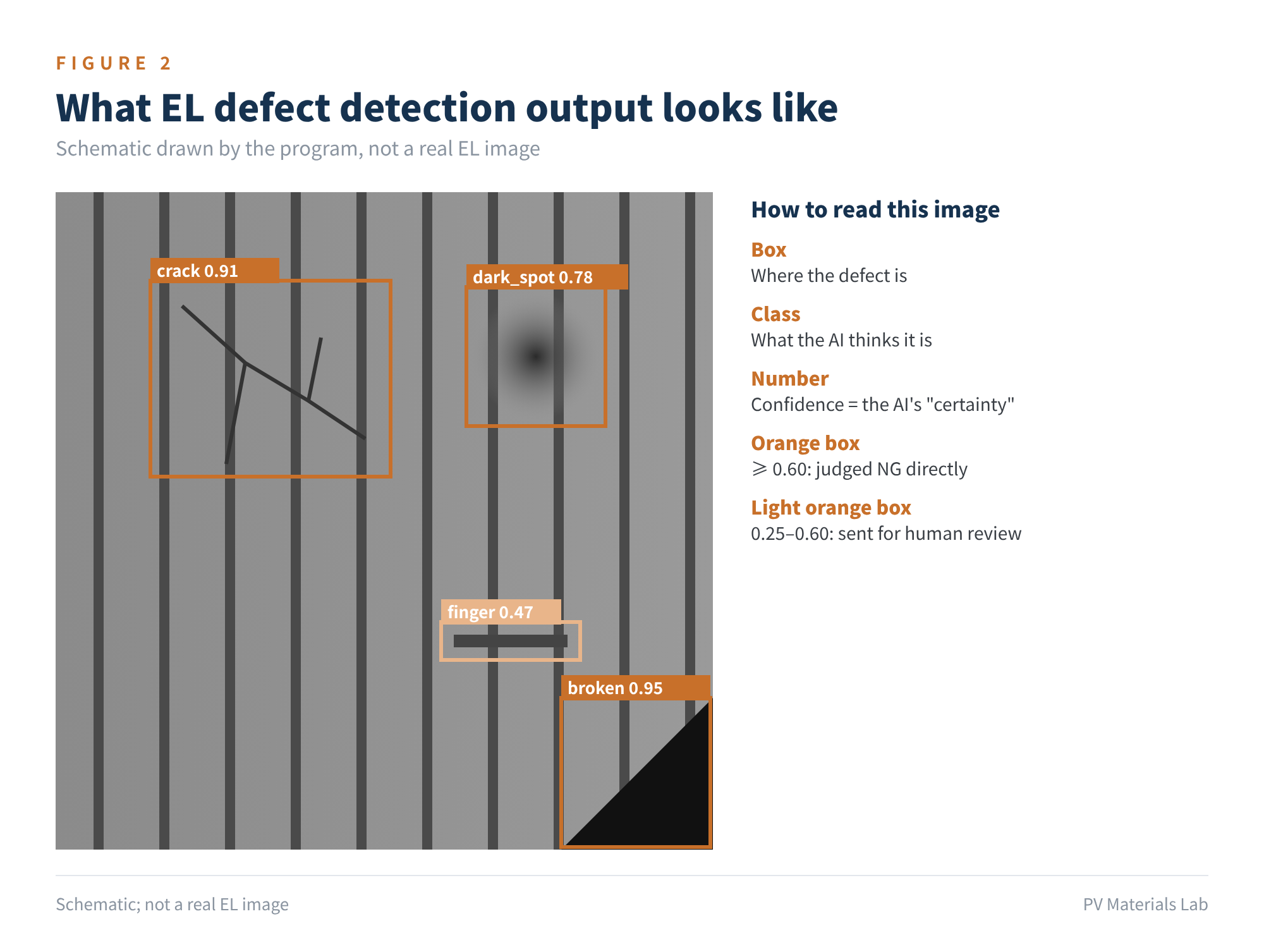
Figure 2 What EL defect detection output looks like (schematic)
Below are the eight classes preset in our code. Use them as they are or adapt them to your factory's standards:
| Code | Defect | Typical EL appearance | Labelling notes |
|---|---|---|---|
| crack | Crack | Dark fine lines, linear, branching or star-shaped | Box the whole crack; box crossing cracks as one |
| finger | Broken finger | Strip-shaped dark area along the fingers | Box the dark area |
| black_core | Black core | Whole central area darker, often concentric rings | Box the dark area |
| dark_spot | Dark spot / dark cell | Locally or wholly reduced brightness | Box local dark areas; box the whole cell if all dark |
| short_circuit | Shorted black cell | Almost entirely black | Box the whole cell |
| broken | Broken / chipped | Missing or broken corners, clear edges | Box the missing area and surrounding cracks |
| scratch | Scratch | Long thin dark line, usually straight | Easily confused with cracks; include comparison images in the rules |
| solder_defect | Poor soldering | Dark areas or uneven brightness along ribbons | Box the abnormal section |
Table 2 The eight preset defect classes
This list is only an example. Define classes according to your existing EL judgement standards; the principle is fewer rather than more, merge similar hard-to-tell classes first, and split them later when you have more data.
Keep three iron rules when labelling:
- One ruler. Write the judgement standard as "labelling rules" with example images; before several people label, have them all label the same batch, align on differences, then start.
- Tight boxes. Box the defect itself, without large empty margins and without cutting off part of it.
- Include good cells. Put defect-free images in the training set with empty labels, so the model knows what a good cell looks like; otherwise it will "find faults" everywhere.
On data volume, experience suggests that a usable starting point needs one or two hundred samples per defect class, a few thousand images in total. If you don't have data yet, practise on public datasets: PVEL-AD, jointly released by Hebei University of Technology and Beihang University, has 36,543 near-infrared EL images, 12 defect classes (plus defect-free images) and bounding boxes, and requires a signed request form sent from an institutional email; ELPV, released by ZAE Bayern and others in Germany, has 2,624 single-cell greyscale images of 300×300, but labels "defect probability" rather than boxes, so it suits classification practice better.
Note that these public datasets mainly contain older multi- and monocrystalline cells, whose EL appearance differs considerably from today's TOPCon, HJT and multi-busbar/0BB cells. They are fine for practice but must not be used directly in production.
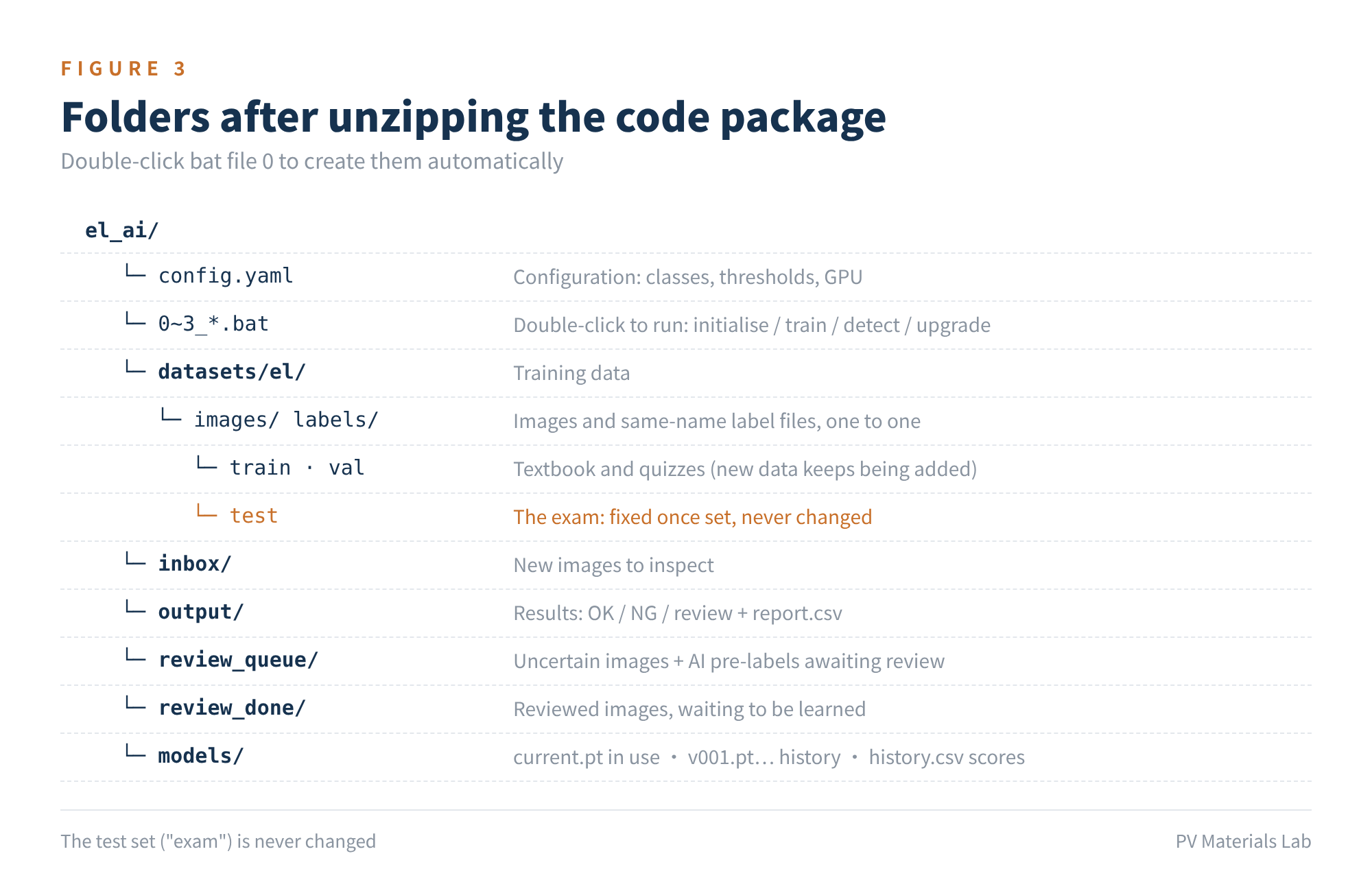
Figure 3 Folder structure of the code package
Split the data three ways: the training set (train) is the textbook, the validation set (val) the class quiz, and the test set (test) the final exam, in a ratio of about 8:1:1. Once the exam is set, never change it; every later "upgrade" decision depends on it. The exam should cover all defect classes, production lines and EL machines.
Labelling rules are the "digital version" of judgement standards. Aligning standards before labelling does more good than switching to any more advanced model.
04First training: getting the model started
Open config.yaml (Notepad will do). Usually you only need to check three things: whether you have a GPU, which model size to use, and the defect classes.
# Starting model: n faster, s balanced, m more accurate
model_base: yolo26s.pt

# 640 for single-cell images; try 1024 for many tiny defects
imgsz: 640

# 0 if you have an NVIDIA GPU; otherwise cpu
device: 0

# Defect classes; don't change the order once set
classes: [crack, finger, black_core,
  dark_spot, short_circuit, broken,
  scratch, solder_defect]
Once edited, double-click "1_首次训练.bat" (first training). The program does four things in turn: reads the data → trains from the pre-trained model → sits the exam → saves the model as v001. The core code is just a few lines:
from ultralytics import YOLO

# Load the pre-trained model
model = YOLO("yolo26s.pt")

# Train: vertical and horizontal flips both make sense for EL;
# greyscale images, so turn off colour augmentation
model.train(data="data.yaml",
    epochs=100, imgsz=640,
    fliplr=0.5, flipud=0.5,
    hsv_h=0.0, hsv_s=0.0)
Why are a few thousand images enough? Because the pre-trained model has already learned to "see edges, textures and shapes" from vast numbers of images; we only teach it to recognise EL defects. This is called transfer learning. Training time depends on image count and GPU: a few thousand images usually take tens of minutes to a few hours on a mainstream GPU, and possibly more than a day on CPU alone.
After training you get a set of scores; understanding these four is enough:
| Metric | In plain terms | If low, it means |
|---|---|---|
| Precision | Of images the AI calls NG, how many are truly NG | Many false calls, heavy re-check workload |
| Recall | Of truly NG images, how many the AI catches | Many misses, defective cells flow downstream |
| mAP50 | Overall score counting roughly correct boxes as right | Weak overall recognition |
| mAP50-95 | Overall score with stricter box-position requirements | Boxes are imprecise |
Table 3 Understanding the four training metrics
For EL, recall matters more than precision: a false call costs an inspector one more look, while a miss could mean a cracked module ends up in a power plant. That is why recall has veto power in the upgrade rules later. After training, the runs folder also contains a confusion matrix showing how well each defect class has been learned.
05Going live: pick out the uncertain images
Daily use is simple: put new EL images in the inbox folder and double-click "2_检测新图.bat" (detect new images). Unlike the usual OK/NG either-or, we route images three ways:
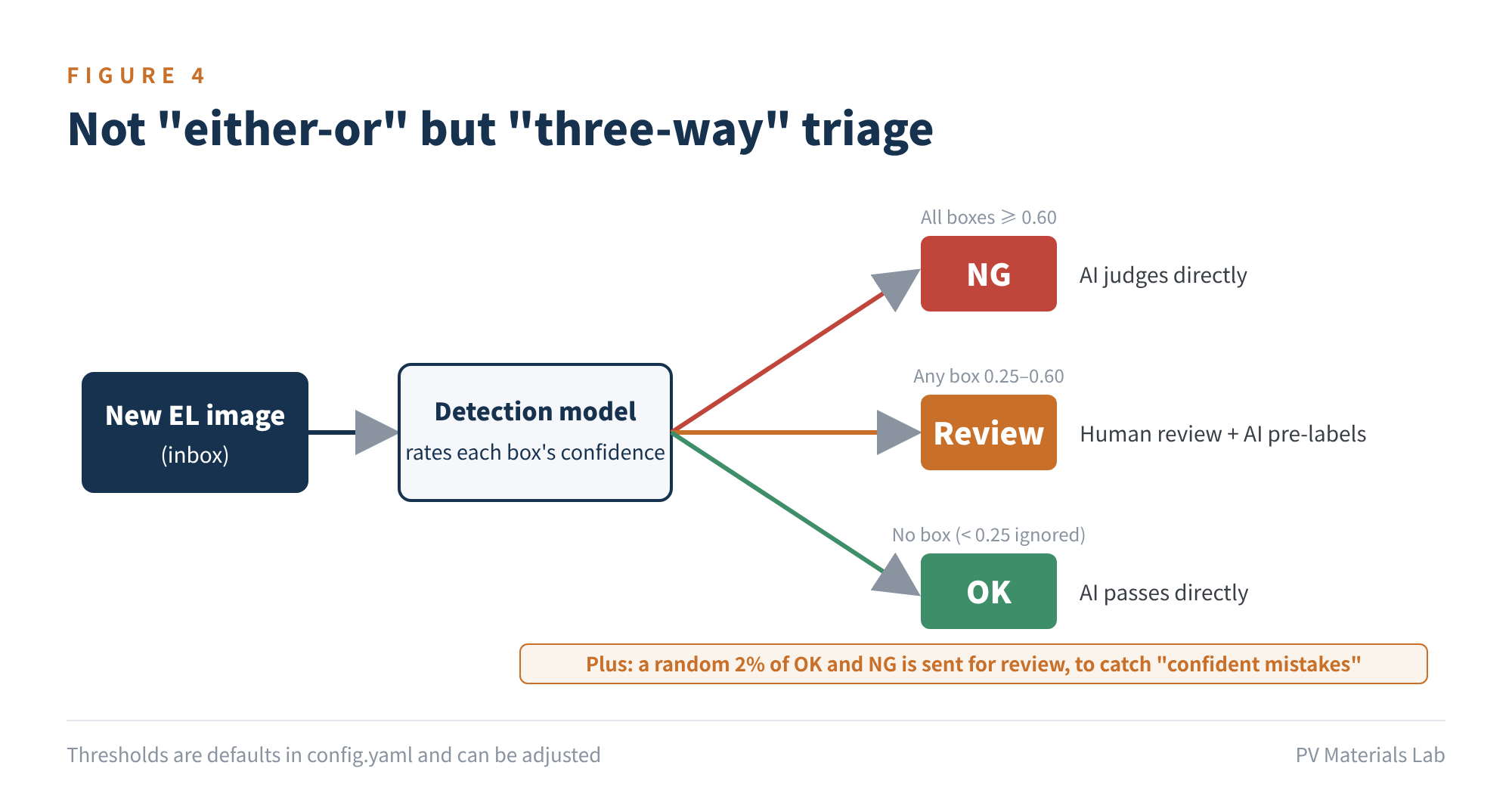
Figure 4 Three-way triage of detection results
- NG: all defect boxes have confidence of 0.60 or above; the AI judges directly.
- Review: if any box has confidence between 0.25 and 0.60, the image goes to human review with the AI's pre-labels attached.
- OK: no boxes at all (boxes below 0.25 are ignored); the AI passes it directly.
Think of confidence as the AI's "certainty". High certainty goes to the AI, low certainty to people: the AI takes the large number of "obvious at a glance" images, and people only look at the genuinely hard ones. All thresholds are in the configuration file and adjustable: be conservative early on and send more to review, then tighten gradually as the model improves.
In addition, the program randomly sends 2% of OK and NG images for review. The AI's most dangerous error isn't being unsure; it's being confidently wrong, and this sampling is designed to catch exactly that. The core triage logic is:
if any box confidence is between 0.25 and 0.60:
    result = "Review"
elif there are boxes (all >= 0.60):
    result = "NG"
else:
    result = "OK"
spot_check = result is not "Review" and random number < 0.02
Each run creates a time-stamped results folder, with OK, NG and Review subfolders containing images with boxes drawn, and a report.csv summarising each image's result and defects, which opens directly in Excel.
The point of three-way triage: the AI handles the "certain majority", people focus on the "uncertain minority", and the way people handle that minority is the raw material for self-learning in the next section.
06Self-learning: one human judgement, one lesson for the model
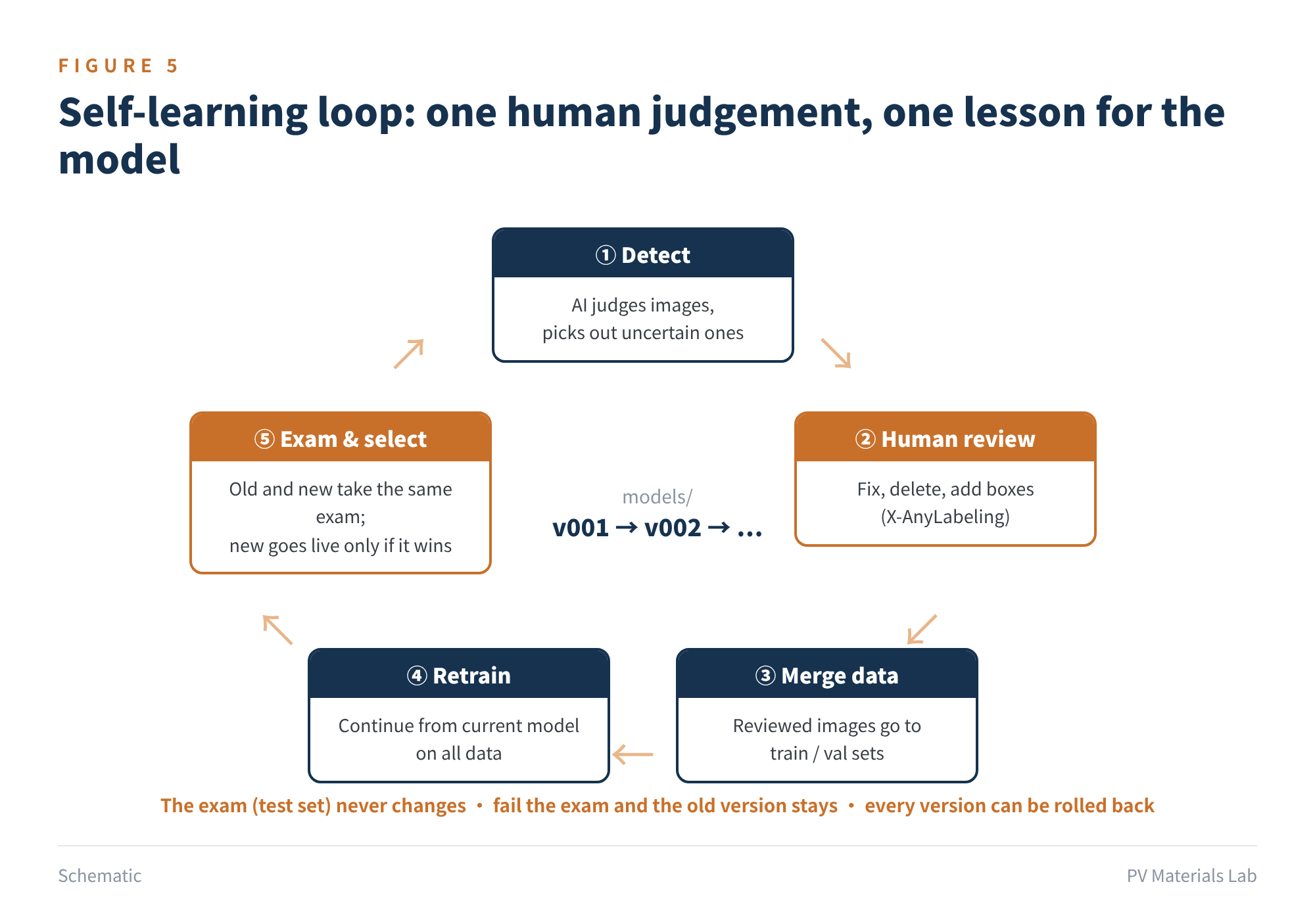
Figure 5 The self-learning loop
After detection, the review_queue folder accumulates "images the AI was unsure about + the AI's pre-labels". The loop then has five steps:
- ① Review. Open the images in review_queue with X-AnyLabeling, import the pre-labels in YOLO format (the class list classes.txt is ready), and fix, delete or add boxes; for confirmed good cells, delete all boxes.
- ② Hand over. Move the corrected images and their label files together into the review_done folder.
- ③ Learn. Double-click "3_学习升级.bat" (learn and upgrade). 90% of reviewed images go to the training set and 10% to the validation set, and training continues from the current model.
- ④ Exam. Old and new models sit the same exam.
- ⑤ Select. The new model goes live as a new version only if its mAP50-95 improves by at least 0.005 and its recall drops by no more than 0.01; otherwise the old one stays.
old_score = exam(current model)
new_score = exam(newly trained model)
if (new_score.mAP50_95 - old_score.mAP50_95 >= 0.005
    and new_score.recall >= old_score.recall - 0.01):
    upgrade to new version (v002…), keep the old version
else:
    keep the old model, log this score in history.csv
Three easily overlooked designs decide success or failure:
- Keep training on all the data. Train only on new images and the model "learns the new and forgets the old", known in AI as catastrophic forgetting. So every round of learning combines old and new data.
- Never touch the exam. Reviewed images go only into the training and validation sets, never the test set. Otherwise it's like giving students the exam questions in advance: scores look good, then it all falls apart in production.
- Keep every version. The models folder stores every version and history.csv records every score. If a new version turns out to have problems, copy an old version to current.pt to roll back.
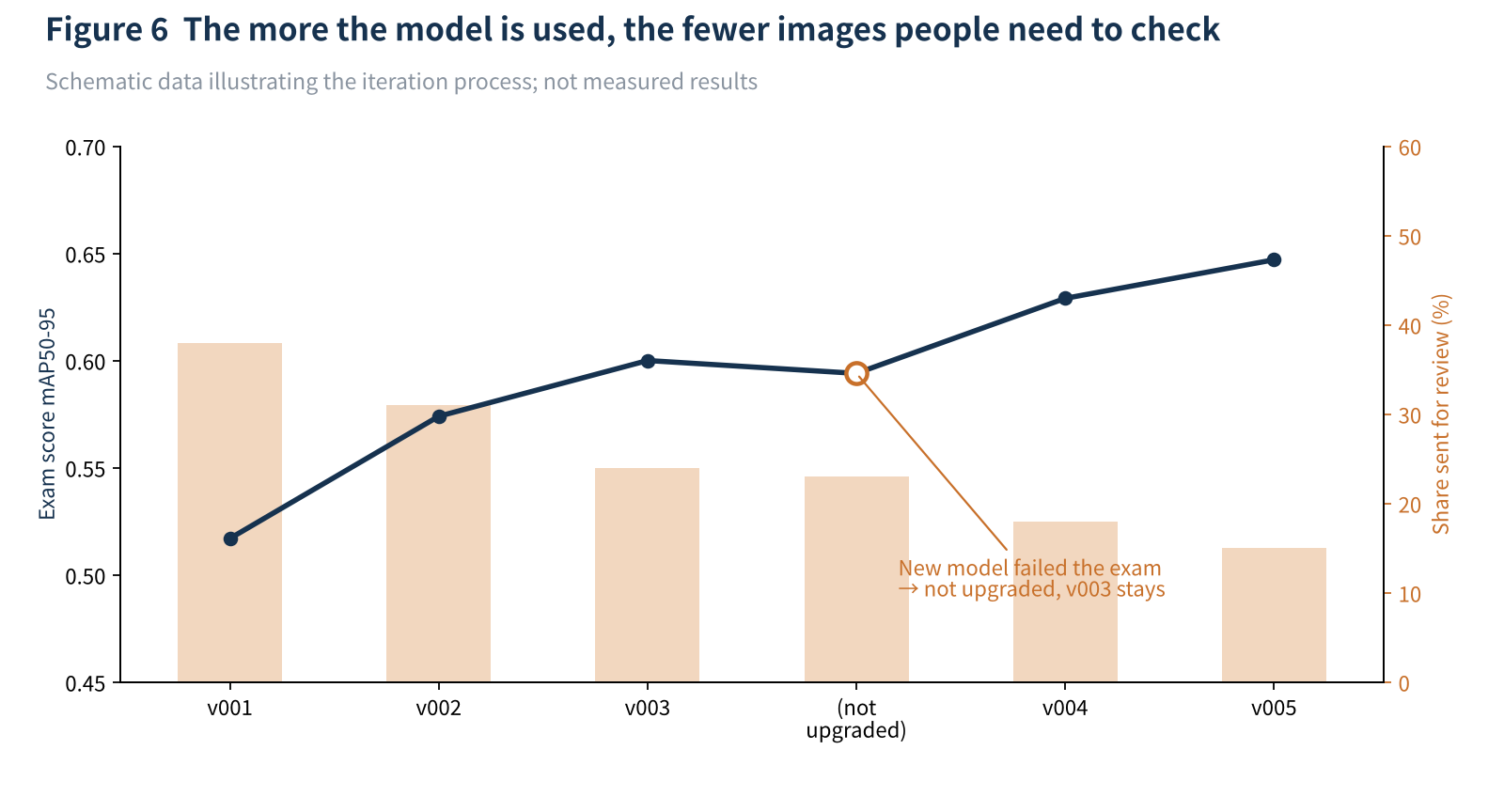
Figure 6 Version iteration (schematic): exam scores rise, review share falls
As for rhythm, learn once you have one or two hundred reviewed images, roughly every one to two weeks. When you change cell technology or EL equipment, or a new defect type appears, lower the thresholds appropriately so more images go to review.
Some may ask: why not let the model learn entirely by itself, training on its own judgements? Because if images it judged wrongly are used for training, the errors are "reinforced" and it drifts further off course. Keeping people in the loop is the baseline for industrial use.
"Self-learning" essentially means turning every human re-judgement into training data: inspectors' experience no longer leaves with them, but stays in the model.
07Pitfall checklist: traps we have fallen into, and seen others fall into
- Standard drift. If inspectors or shifts judge differently, the model learns "chaos". Align the rules first, then label at scale.
- Equipment differences. Different EL machines differ in exposure, resolution and camera. When changing equipment or adding lines, validate on a few hundred images first, and add data from that machine if needed.
- Shrinking whole-module images directly. Full-module EL images are high resolution and defects relatively tiny; shrink straight to 640 pixels and fine cracks may disappear. Cut images by cell first, or increase imgsz.
- Class imbalance. Cracks number in the hundreds or thousands, shorted black cells only a handful. Collect rare classes deliberately, and merge them if there are too few.
- Exam contamination. Mixing test images into the training set inflates scores. Store the test set separately and check regularly for duplicate images.
- Only watching the total score. The overall mAP may rise while one class (cracks, say) gets worse. After each upgrade, look at the confusion matrix and track key classes separately.
- Open-source licence. Ultralytics uses the AGPL-3.0 licence. If you integrate the program into a product sold externally or offered as a service, assess the open-source obligations or buy a commercial licence.
08Final thoughts
AI is not here to replace inspectors. What is really valuable is turning a veteran's ability to "see at a glance whether it's a crack or a scratch" into a capability that can be copied, accumulated and won't be lost when people move on.
One person with one computer can run this program, so the cost of trying is low. We suggest a small pilot on one process and one cell type for a month or two, focusing on two things: whether the share sent for review falls steadily, and whether spot checks catch the AI's "confident mistakes". Those two numbers show the loop is really turning.
If you'd like the complete code package for this article (with double-click bat files, configuration files and instructions), or want to tell us which factory problem you'd most like AI to help with, we would be glad to hear from you. We will keep updating our AI + PV series.
References
- Ultralytics. Models Supported by Ultralytics (YOLO26 and others); Ultralytics Roadmap
- Ultralytics. Key Highlights from Ultralytics YOLO Vision 2026 (YOLO27 unveiled)
- Su B, Zhou Z, Chen H. PVEL-AD: A Large-Scale Open-World Dataset for Photovoltaic Cell Anomaly Detection. IEEE Transactions on Industrial Informatics. github.com/binyisu/PVEL-AD
- Buerhop-Lutz C, Deitsch S, et al. A Benchmark for Visual Identification of Defective Solar Cells in Electroluminescence Imagery. 35th EU PVSEC, 2018. github.com/zae-bayern/elpv-dataset
- Deitsch S, et al. Automatic Classification of Defective Photovoltaic Module Cells in Electroluminescence Images. Solar Energy, 2019, 185: 455-468.
- X-AnyLabeling: A Unified Desktop Platform for AI-Assisted Data Annotation. github.com/CVHub520/X-AnyLabeling
- Ultralytics Licensing (AGPL-3.0 and commercial licences)
A PV R&D and technology team with 10+ years of experience | In-depth technical knowledge sharing
Materials · Reliability · Failure Analysis · Standards & Certification · Products · Processes
Exploring AI + PV; collaboration welcome
Disclaimer:
1. Original content reflects the authors' personal views only, is for reference only and does not constitute investment advice.
2. Reposted and cited content is credited to its source, out of respect for original work.
3. Some content was produced with AI assistance (chart generation, data retrieval, concept explanations, etc.); the core framework and key content were written by our technical team and reviewed by people.
4. If anything is inaccurate or infringes your rights, please leave a message or contact us and we will deal with it.